CEAC Document Upload: Get NVC Scans Under the 4 MB File Size Limit
By Bishal Neupane · · 7 min read
After USCIS approves an immigrant petition, the case moves to the State Department's National Visa Center (NVC), and you upload the Affidavit of Support and civil documents through the CEAC website. CEAC is stricter than USCIS: each file must be 4 MB or smaller, and a multi-page document has to go up as one file. A color scan of a full I-864 with its attachments can run several times that. Here are the official rules and how to meet them without sending your documents to anyone else's server.
What the State Department requires for CEAC scans
The rules are on travel.state.gov under Step 8: Scan Collected Documents of the immigrant visa process:
- Size: "Each individual file (scanned document) must be no larger than 4 MB (megabytes)."
- Format: .pdf (preferred), .jpg or .jpeg.
- One document, one file: scan and upload a multi-page document, such as the I-864, as one file. If it is more than 4 MB, compress it.
- Not accepted: "zipped" files, modifiable PDFs and password-protected files.
- Color: scans must be in color.
- Both sides: include the front and back of any document with stamps, seals or writing on the back.
- Translations: put the certified translation in the same file as the original document. No translation is needed for documents in the language of the country where the interview will take place.
- Readable and upright: clear, nothing cut off, and oriented so it reads across the screen without rotating.
Many older articles and forum posts quote a 2 MB limit. The official page says 4 MB as of November 2026. If the upload screen in CEAC shows a different number, go by the limit shown on the upload page.
State's page says to compress a file that is too big, and also that it cannot accept "zipped" files. A .zip archive is rejected. A PDF made smaller by a PDF compressor is still an ordinary PDF, which is what CEAC wants.
Compress a PDF under 4 MB for CEAC
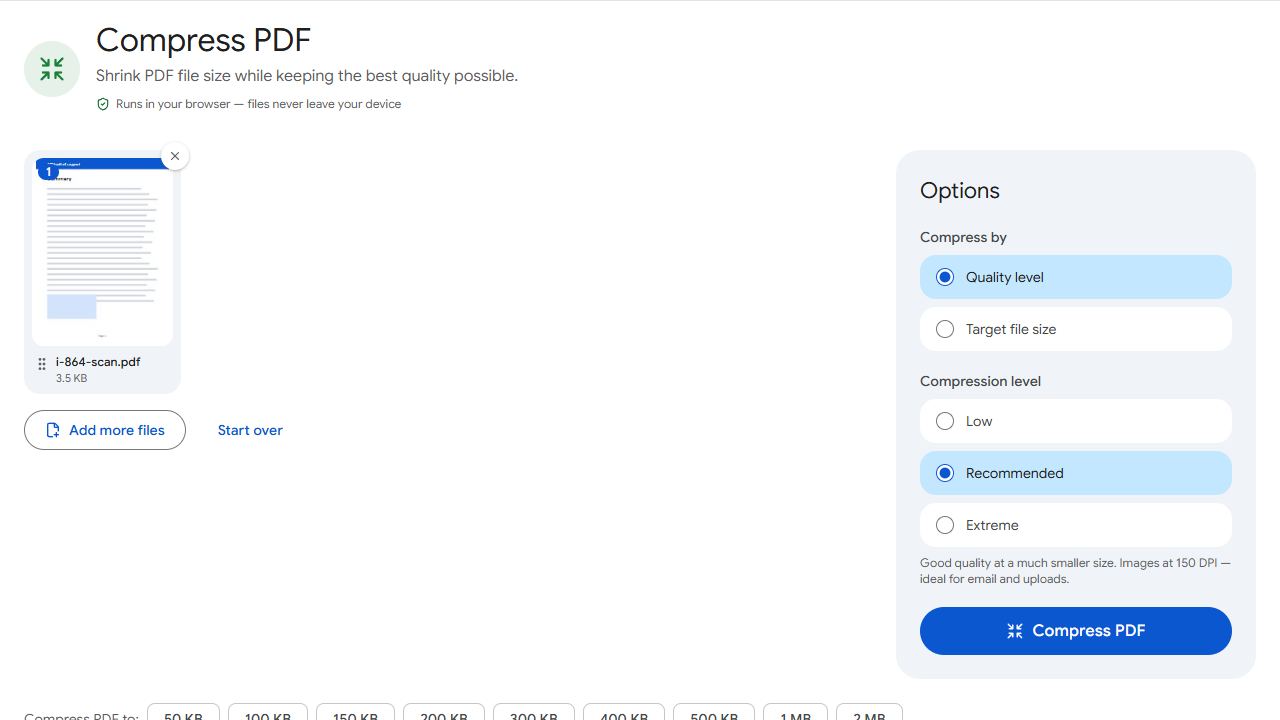
- Open Compress PDF and add the scanned document.
- Choose Target file size and type 4000 KB, which is 4 MB. For a margin, type 3500.
- Click Compress PDF. The result reports the final size and whether it fits under your number.
- Open the download and zoom in on stamps, seals, handwriting and small print. NVC sends a case back for corrections when the documents are not right, and an unreadable scan is an avoidable reason.
- Upload the file to the matching document slot in CEAC.
The compressor re-encodes the scanned images, lowering quality first and reducing resolution only if it has to, and it reports the final size so you know it fits before you log in to CEAC. Typed text in a PDF you downloaded, such as an IRS tax transcript, is real text and stays sharp.
Everything runs in your browser. Your passport, police certificate and tax records are not uploaded to PDFCraftly or anywhere else. The State Department gives related advice for shared machines: if you use a public computer, delete your scanned documents once you have finished uploading them.
PDFCraftly counts 1 KB as 1,000 bytes, so a file that fits 4000 KB here is under 4 MB however CEAC counts a megabyte. If you want a lot of headroom for a short document, Compress PDF to 2 MB is one click.
A long I-864 or tax package that will not fit
The Affidavit of Support is the file that causes the most trouble, because the form runs to many pages and sponsors add tax and income evidence on top. State wants a multi-page document as one file, so cutting the form itself into parts is not the answer. Work through this instead:
- Follow the slots CEAC gives you. CEAC lists the documents it wants under Affidavit of Support Documents and Civil Documents. Upload each document to its own slot instead of merging everything you have into one giant PDF.
- Remove pages that are not part of the document, such as blank backs or a scanner cover sheet, with Remove Pages. Keep every page of the form itself.
- Compress to 4000 KB and check the result.
- Rescan if the text has gone soft. Lay each page flat in even light and fill the frame. Scan to PDF uses your phone camera and saves all the pages as one PDF. A clean scan compresses far better than a dim, angled photo.
State's own guidance points the same way: if you cannot read a scan, rescan it at a higher resolution, then compress the file before uploading.
Front and back, translations and page direction
Three of State's image rules are about how the file is put together, not how big it is.
- Front and back in one file. Scan both sides of a birth or marriage certificate that has stamps or writing on the back, then join them with Merge PDF.
- Original plus translation in one file. Merge the foreign-language document and its certified translation, then compress the merged file to 4 MB.
- Upright pages. If a page came out sideways, turn it with Rotate PDF and save. To put pages in a different order, use Organize PDF.
- Photos of pages. If you photographed a document as several JPGs, combine them into one PDF with JPG to PDF so the document goes up as a single file.
Merging adds the sizes together, so always compress after merging, not before.
Fillable forms and password-protected files
CEAC does not accept "modifiable PDFs" or password-protected files. The page does not define modifiable further; a fillable form saved straight from your computer, with fields that can still be typed in, is the likely case. State's instruction for forms avoids the question: type or use a pen to complete the form, sign it by pen, and scan the signed paper. The scan is a picture of the page, with nothing left to edit.
If a bank statement or employer letter opens only with a password, remove it with Unlock PDF before uploading. You need to know the password; the tool does not break one.
When every required file is in place for each person, press Submit Documents in CEAC. State's Step 9 notes that the button does not work until all required documents are uploaded, that you should not mail documents to NVC unless told to, and that you must bring every civil document you uploaded to the visa interview.
Common problems and fixes
- CEAC rejects my file as too large.
- Each file must be 4 MB or smaller. Open Compress PDF, set Target file size to 4000 KB (or 3500 for a margin) and upload the compressed copy. The result line tells you the final size before you go back to CEAC.
- My I-864 scan is many times over the limit and looks bad at 4 MB.
- Rescan rather than squeezing harder. Use Scan to PDF in even light with each page flat and filling the frame, remove any blank pages with Remove Pages, then compress to 4000 KB. Do not split the form into parts; State asks for a multi-page document as one file.
- I uploaded a zip file and it was not accepted.
- The State Department does not accept "zipped" files. Upload a normal PDF or JPG instead. A PDF made smaller with Compress PDF is still a regular PDF, not a zip archive.
- NVC asked for corrections because a scan is hard to read or cut off.
- Rescan the whole page so no edge is missing, in color, and check it upright on screen. Fix a sideways page with Rotate PDF. Compress again to 4000 KB, zoom in to confirm stamps and seals are legible, then press Submit Documents again in CEAC.
- My translation and the original are separate files.
- State wants the certified translation in the same file as the original document. Join them with Merge PDF, then compress the merged file under 4 MB.
- The PDF opens with a password.
- CEAC does not accept password-protected files. Remove the password with Unlock PDF (you must know it), then upload the unlocked copy.
Frequently asked questions
4 MB per file. The State Department's Step 8 page says "Each individual file (scanned document) must be no larger than 4 MB (megabytes)." Older posts mention 2 MB; go by the official page and the limit shown on the upload page.
PDF (preferred), JPG and JPEG. Zipped files, modifiable PDFs and password-protected files are not accepted.
Yes. The State Department's image quality rules say scans must be in color, clear, complete and oriented so they can be read without rotating.
The State Department says to scan and upload a multi-page document, such as the I-864, as one file, and to compress it if it is over 4 MB. Compress or rescan instead of splitting.
4,000 KB. Type 4000 in Target file size in Compress PDF. PDFCraftly counts 1 KB as 1,000 bytes, so the result is under 4 MB however the portal counts.
No. Compression, merging and rotating all run in your browser on your device. The only place your files go is CEAC, when you upload them yourself.
Yes. The State Department says you must bring every civil document you uploaded and submitted to your visa interview, and that you should not mail documents to NVC unless it specifically tells you to.