USCIS File Too Large? Compress a PDF Under 12 MB for Evidence Uploads
By Bishal Neupane · · 7 min read
You are filing a form in your USCIS online account, you attach a scanned passport, tax transcript or bank statement, and the uploader refuses it because the file is too large. The limit is 12 MB per file, and a color phone scan of a 20-page document goes past that easily. Here is exactly what USCIS asks for, with the source, and how to get a PDF under 12 MB in about a minute while the document stays on your own computer.
What USCIS accepts for evidence uploads
USCIS lists the rules on its Tips for Filing Forms Online page (last reviewed October 7, 2026). The same list appears for both ways of filing online, the guided form and the PDF upload:
- Size: "Files must not be larger than 12MB." That is per file.
- Format: files "generally must be PDFs, JPGs, or JPEGs". For some forms USCIS also accepts TIF or TIFF.
- No passwords: "Do not encrypt or password-protect your files."
- Readable: scan or photograph each document and make sure every image is clear and all text can be read.
- Foreign-language documents: upload the original, a certified English translation and the translator's certificate for each document.
- Passport-style photos: scan them or take a picture with your phone.
The page does not publish a rule for file names or a limit on how many files you can attach. If the upload screen for your form shows its own instructions, follow those.
12 MB is a ceiling, not a target. A clean scan of a few pages is usually 1 to 3 MB, and smaller files upload faster on a slow connection.
Compress a PDF under 12 MB for USCIS
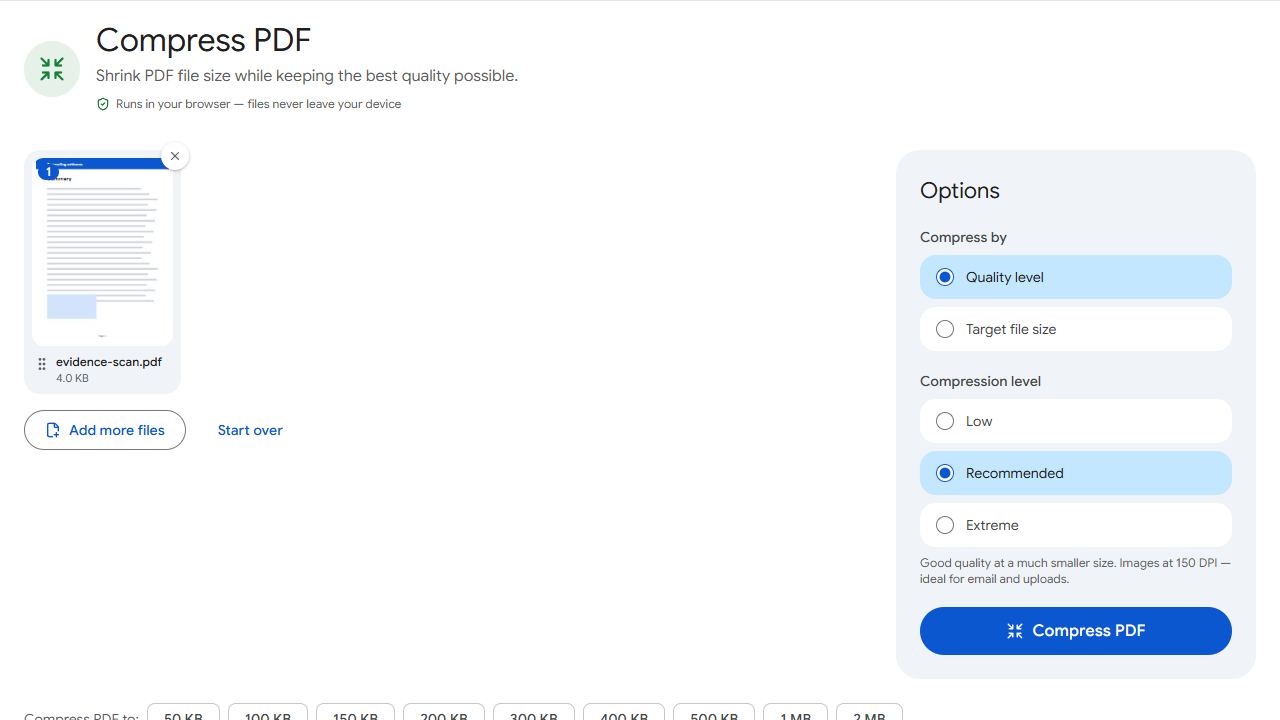
- Open Compress PDF and add your file.
- Choose Target file size and type 12000 KB, which is 12 MB. To leave a margin, type a lower number such as 10000.
- Click Compress PDF. The result reports the final size and whether it fits under the number you typed.
- Download the file, open it and zoom in on the smallest print (dates, stamps, account numbers). If you can read it, USCIS can too.
- Attach the compressed file in your USCIS online account.
The compressor re-encodes the images inside the PDF. It lowers image quality first and reduces image resolution only if quality alone is not enough. Real text, such as the typed words in a bank statement you downloaded as a PDF, is left alone and stays sharp.
Nothing is uploaded during this step. The compression runs in your browser, so a passport, birth certificate or tax return never leaves your device. That matters for immigration papers, which carry your A-Number, date of birth and often your Social Security number.
PDFCraftly counts 1 KB as 1,000 bytes, so 12000 KB is 12,000,000 bytes. That fits whether a portal counts a megabyte as 1,000,000 bytes or as 1,048,576 bytes.
When the scan is far over the limit
A 60 MB scan of a long document can be forced under 12 MB, but the pages may get too soft to read. Try these first, in this order:
- Drop pages nobody asked for. Blank backs and duplicate pages add megabytes. Take them out with Remove Pages, or keep only the ones you need with Extract Pages.
- Compress what is left to 12000 KB and check that it is still readable.
- Split it if the upload section takes more than one file. Split by Size cuts a PDF into parts that are each under the size you enter. Name the parts so the order is obvious, for example
bank-statements-part-1.pdfandbank-statements-part-2.pdf. - Rescan if it is still unreadable. A flat page in even light, filling the frame, makes a much smaller file than a dim photo with a table around it. Scan to PDF uses your phone camera and saves straight to PDF.
For a single photo, such as a passport-style picture saved as a JPG, use Compress JPG instead and set the same target.
Password-protected and encrypted PDFs
Banks, payroll services and some government agencies send statements as PDFs that ask for a password when you open them. USCIS tells filers not to encrypt or password-protect files, so remove the protection before you upload.
- Open Unlock PDF and add the file.
- Type the password you normally use to open it. The tool removes a password you know; it does not crack one you have lost.
- Download the unlocked copy and compress it if it is over 12 MB.
If you protected a file yourself to email it to a lawyer or family member, upload the unprotected original to USCIS, not the protected copy.
One document, one file: combining pages and translations
Phone scans often arrive as a pile of separate images or one-page PDFs. Evidence is easier to review when each document is one file in page order.
- Turn photos of pages into a single PDF with JPG to PDF.
- Join one-page PDFs with Merge PDF, for example the original document, its certified English translation and the translator's certificate.
- Fix sideways or upside-down pages with Rotate PDF so nobody has to turn their screen.
- Compress last. Merging adds the file sizes together, so check the total against 12 MB after you combine.
Give each file a plain, descriptive name such as birth-certificate-with-translation.pdf. USCIS itself tells PDF filers to give the form a "clear, descriptive title", and the same habit helps you pick the right file in the upload dialog.
For more ways to shrink a file, see how to compress a PDF or browse all guides.
Common problems and fixes
- USCIS still says the file is too large after I compressed it.
- Check the size of the file you actually attached; it is easy to pick the original again. In Compress PDF, set Target file size to 12000 KB or lower and read the result line, which states the final size. If the upload screen for your form shows a smaller limit than 12 MB, type that number instead.
- The upload fails but the file is well under 12 MB.
- Size is not the only rule. USCIS takes PDF, JPG and JPEG (TIF or TIFF only for some forms) and tells filers not to encrypt or password-protect files. Turn a JPG into a PDF with JPG to PDF if the form wants a PDF, and remove a known password with Unlock PDF.
- The compressed scan is too blurry to read.
- The file was pushed too far. Remove pages you do not need with Remove Pages and compress again, or rescan in good light with the page filling the frame. A cleaner scan stays readable at a much smaller size.
- My document is 80 pages and will not fit in one 12 MB file.
- If the upload section accepts more than one file, cut the PDF into parts under 12 MB with Split by Size and name them in order (part 1, part 2). If it takes only one file, compress as far as stays readable and include only the pages USCIS asked for.
- I have ten separate photos of one document.
- Combine them into one PDF with JPG to PDF, check the page order, then compress the PDF. One file per document is easier to review than ten loose images.
Frequently asked questions
12 MB per file. USCIS's Tips for Filing Forms Online page says "Files must not be larger than 12MB" for evidence uploaded with either the guided online form or the PDF upload option.
Generally PDF, JPG and JPEG. USCIS says it also accepts TIF or TIFF for some forms. Other formats, such as Word documents, are not on that list, so convert them first.
Yes. PDFCraftly compresses the file in your browser, on your own device. The document is not uploaded to a server, so nobody else receives a copy.
No. USCIS says not to encrypt or password-protect files. Remove the password with Unlock PDF first; you need to know the password to do that.
12,000 KB. Type 12000 in the Target file size box in Compress PDF. PDFCraftly counts 1 KB as 1,000 bytes, the stricter reading, so the result fits either way a portal measures it.
No. Compression re-encodes the images in the PDF and leaves real text as it is. A scanned page is an image, so always open the result and check that small print is still readable before you upload.