Irembo Document Upload Limits: Fit PDFs Under 500 KB and Photos Under 200 KB
By Bishal Neupane · · 6 min read
Rwanda's IremboGov portal rejects attachments that are too big or in the wrong format, and the e-passport form is the one most people get stuck on. The limits are small: 500 KB for a PDF, less for a photo or signature. A phone scan is usually 2 to 5 MB, so almost every document needs compressing first. Here is what Irembo asks for, with the source for each number, and how to get every file under the limit in a minute.
What Irembo asks for
Irembo's help centre states the limits for the e-passport application in its first-time e-passport guide:
- Documents (copy of national ID, letters, certificates): PDF format, maximum 500 KB each.
- Passport photo: JPG format, maximum 200 KB.
- Signature: PDF format, maximum 50 KB.
The portal's e-passport FAQ is looser: it lists the photo and signature as JPG up to 500 KB, and repeats that supporting documents "must be in PDF format and be less than 500 KB". The same 500 KB PDF rule appears on other services, such as the CEPGL travel document renewal and the emergency travel document. Because the two e-passport articles disagree on the photo and signature, aim for the stricter numbers, and read the format and size shown next to each upload field on the form itself.
If a file meets the stricter limit (PDF under 500 KB, photo under 200 KB, signature under 50 KB) it passes under either version of the rules.
Compress a PDF to 500 KB for Irembo
- Scan the document to PDF. Scan to PDF uses your phone camera and saves straight to PDF; good daylight gives a cleaner, smaller file.
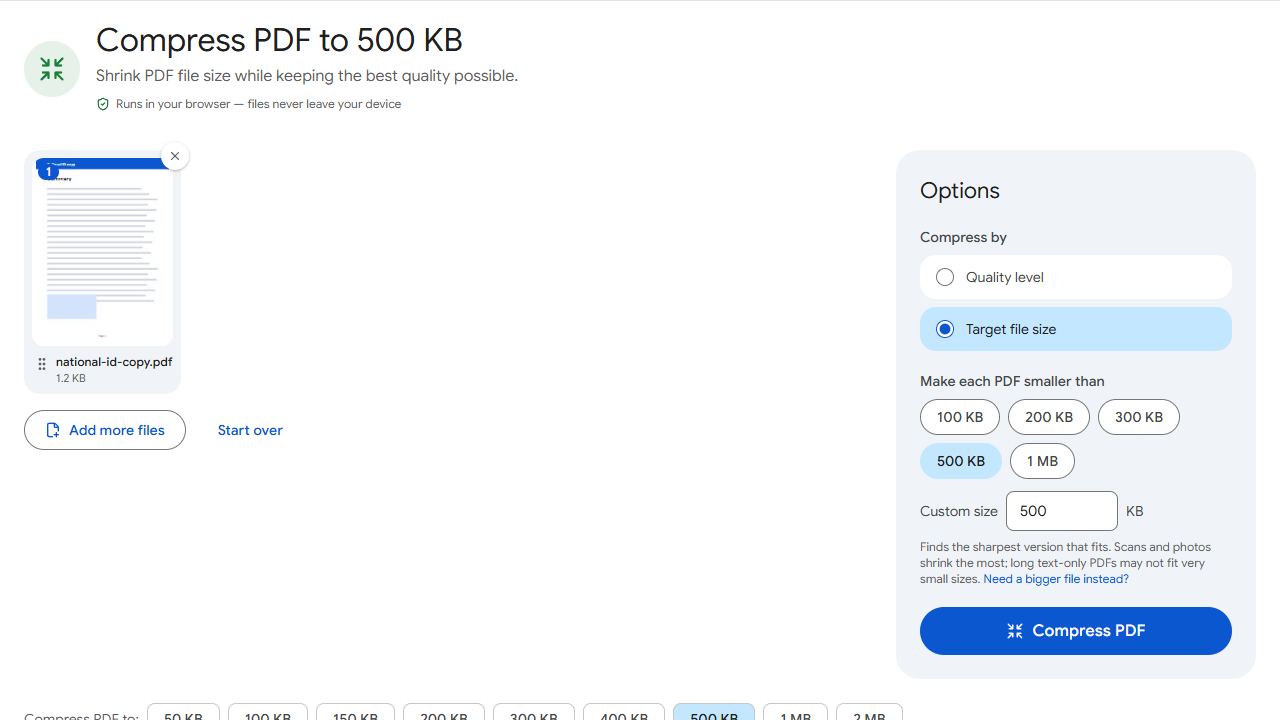
- Open Compress PDF to 500 KB. For a different limit, open Compress PDF and type the number under Target file size.
- Add the PDF and click Compress PDF. The result tells you the final size and whether it fits, for example "412 KB, fits under 500 KB".
- Download the file and attach it on Irembo.
The compressor lowers the JPEG quality of the scanned pages first and only reduces their dimensions if that is not enough, so a one- or two-page ID scan stays readable. Nothing is uploaded: the compression runs in your browser, and the file never leaves your phone or computer.
Irembo gives each document its own upload field, so keep one document per PDF. If one field needs the front and back of your national ID, or several pages of a letter, combine them with Merge PDF before compressing, so the whole thing fits in one 500 KB file.
Passport photo under 200 KB as a JPG
Irembo's photo requirements want a plain white background, a shape between square and portrait (height 50 to 100 percent of the width), your face centred with the eyes in the upper half, no filters, and no scan of an old passport or ID photo. A photo from a phone camera easily meets those rules but is far too big in kilobytes.
- Crop the photo in your phone's gallery app so it shows your head and the top of your shoulders, roughly square.
- Open Compress JPG to 200 KB and add the photo. PNG and other formats are converted to JPG, which is what Irembo asks for.
- Click Compress images and download the JPG. The result shows its size in KB and its pixel dimensions.
Cropping first matters: every pixel of background costs space, so a tight crop keeps more detail in your face within the same 200 KB.
Signature under 50 KB
The first-time guide asks for the signature as a PDF of 50 KB or less. Sign on plain white paper with a dark pen, photograph it in daylight, and crop tightly around the ink. Then convert it with JPG to PDF and shrink it with Compress PDF to 50 KB. If the upload field on your form says JPG instead, skip the conversion and use Compress JPG to 50 KB.
A tightly cropped signature is small, so it usually fits under 50 KB on the first try. If the form sets a minimum size and your file is below it, Increase PDF Size pads it to the minimum without changing the image.
Habits that keep Irembo uploads small and readable
- Scan at about 200 DPI. Higher resolutions only make the file bigger before compression.
- Crop away the table or floor around the document, or trim margins later with Crop PDF.
- Attach only the pages the service asks for. Drop extras with Remove Pages before compressing.
- Name files in plain letters, such as
national-id.pdf, so you pick the right one in the upload dialog. - Check the format next to each field: Irembo wants PDF for documents and JPG for the photo, and it will not accept a PDF where it expects a JPG.
The same approach works for other East African portals; see Kenya's eCitizen passport uploads for its photo and file rules.
Common problems and fixes
- Irembo says the file is too large even after compressing.
- Check the limit printed beside that upload field; some fields are smaller than 500 KB. Compress again in Compress PDF with that exact number as the Target file size. The result line tells you the final size before you upload.
- The field will not accept my photo.
- Irembo wants the passport photo as a JPG, not a PDF or PNG. Compress JPG saves the result as JPG whatever you started with. Also check the photo rules: white background, roughly square, face centred, no filters.
- I was asked to upload a PDF but my scan is a JPG.
- Convert it with JPG to PDF, then run the PDF through Compress PDF to 500 KB so it meets the document limit.
- The compressed ID copy is blurry.
- Rescan in daylight with the ID filling the frame, then compress again. A bright, tightly cropped scan compresses far better than a dim one with lots of background, and the compressor keeps the sharpest version that fits.
- My national ID front and back are two files but the form has one field.
- Combine them into one PDF with Merge PDF, then compress the merged file to 500 KB.
Frequently asked questions
For the e-passport application Irembo's help centre states PDF documents up to 500 KB, a JPG passport photo up to 200 KB and a PDF signature up to 50 KB; its FAQ lists the photo and signature as JPG up to 500 KB. Meet the stricter numbers and check the limit shown on the form, since services differ and rules change.
Documents such as the national ID copy, letters and certificates must be PDF. The passport photo must be JPG. The signature is listed as PDF in the step-by-step guide and JPG in the FAQ, so follow the format shown on your form's upload field.
Yes. PDFCraftly compresses in your browser, on your device. The file is not uploaded to any server.
Yes. PDFCraftly checks results against 1 KB = 1,000 bytes, which is the stricter reading, so a file that fits here fits either way.
Yes. Scanning, compressing and downloading all work in a phone browser, and the compressed file saves to your downloads folder ready to attach on Irembo.