How to Fit Your Oman eVisa Photo and Passport Copy Under 512 KB
By Bishal Neupane · · 5 min read
The Royal Oman Police eVisa portal (evisa.rop.gov.om) is where UAE, Qatar and other GCC residents apply for Oman tourist and express visas. Its most common failure is an attachment that is too big: a phone photo of a passport is often 3 to 5 MB, and the portal allows 512 KB. This guide lists the official attachment rules, with links, and shows how to meet them in a couple of minutes without installing anything.
What the Royal Oman Police portal accepts
These rules come from the portal's own Guidelines for Document Attachments and its FAQ, checked in November 2026:
- File size: maximum 512 KB per attachment. The FAQ repeats it for the passport and the picture: "Not more than 512 KB".
- Formats: PDF, JPEG or PNG are the preferred formats, at 96 DPI.
- File name: only the numbers 0–9 and letters A–Z (upper or lower case), and at most 35 characters. No spaces, hyphens or underscores.
- No compressed archives: ZIP files are refused. If a document is too large, the portal recommends creating a PDF instead.
- Orientation: every attachment must be upright.
- Photo: in colour, taken in the last six months, full face looking at the camera, clear background, well lit, neutral expression with both eyes open, no hat or head covering that hides the hairline unless worn daily for religious reasons, and glasses removed.
The portal tells you on the attachment screen which documents are mandatory for your visa type and which are optional. You cannot continue until every mandatory file is attached, so it is worth preparing them before you start.
Compress the passport copy to under 512 KB
A scanned passport data page is the attachment most likely to be oversized. Since the portal itself suggests a PDF for large documents, make the PDF first and then compress it:
- Scan the data page, or photograph it flat in daylight with Scan to PDF on your phone. Already have a JPG? Turn it into a PDF with JPG to PDF.
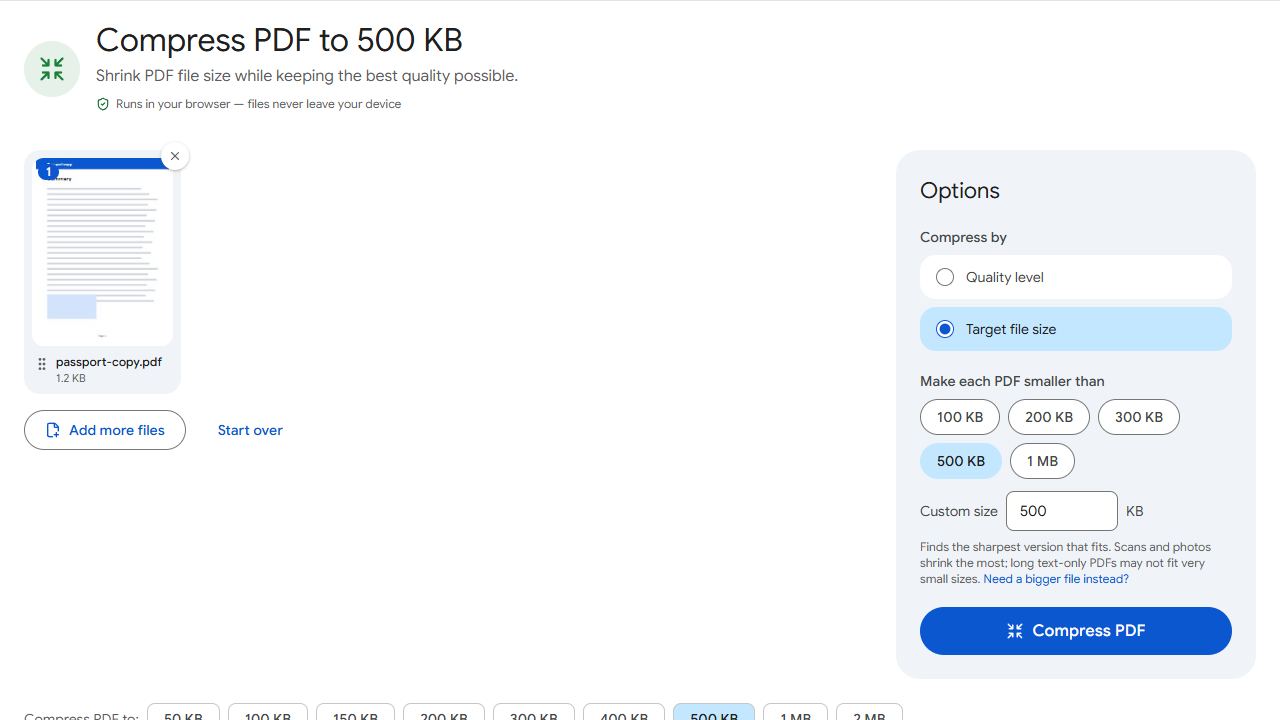
- Open Compress PDF to 500 KB. 500 KB sits safely under the 512 KB limit. For any other limit, use Compress PDF and type the number under Target file size.
- Add the PDF and click Compress PDF. The result tells you the final size, for example "468 KB — fits under 500 KB". If the file was already small enough, it is left exactly as it was.
- Download the file and attach it on the portal.
Results are checked against 1 KB = 1,000 bytes, so a "500 KB" result is at most 500,000 bytes. That is under 512 KB whether the portal counts in thousands (512,000 bytes) or in 1,024s (524,288 bytes). The compression runs in your browser; the passport never leaves your device.
Keep one document per file. A passport copy, a photo and a hotel booking are three separate attachments, each under 512 KB, not one merged PDF.
Get the photo under 512 KB without blurring it
A photo straight from a phone camera is usually 2 to 6 MB. Half a megabyte is plenty for a clear visa photo, so you lose nothing visible by compressing it:
- In your phone's Photos or Gallery app, crop the picture to head and shoulders on a plain, light background. Fewer pixels means more detail survives at the same file size.
- Open Compress JPG, add the photo and enter 500 as the target size in KB.
- Click Compress images. The result shows the final size and, if the picture had to be shrunk, its new pixel dimensions.
The tool lowers JPEG quality first and only reduces the dimensions when that is not enough, so a 500 KB target normally keeps the full-resolution photo. It does not change the background colour or set exact pixel dimensions; a plain, evenly lit wall behind you when the photo is taken is still the easiest way to satisfy the "clear background" rule.
File names, orientation and format fixes
- Rename before uploading.
PassportAhmed.pdforPhoto2026.jpgfollow the letters-and-numbers rule;passport_copy (1).pdfdoes not. - Sideways scan? Fix it with Rotate PDF before compressing. The rotation is saved into the file, so the portal sees it upright.
- Portal wants an image, you have a PDF. PDF to JPG saves the page as a JPG; then compress it as above.
- Too many pages. If the scan has extra pages, keep only the data page with Extract Pages first. Fewer pages compress much better.
- Several photos of one document. Convert them together with JPG to PDF so they become one upright PDF, then compress.
If the portal still shows a size error, open the attachment screen again and read the exact limit printed next to the upload box. Requirements change, and the limit stated on the form is the one that applies.
Common problems and fixes
- The portal still says the file is too large after compressing to 500 KB.
- Check that you uploaded the compressed download, not the original from your camera roll; the compressed file has the same name unless you rename it. If the form shows a smaller limit than 512 KB, compress again in Compress PDF with that number as the target.
- The file name is rejected.
- The portal accepts only letters A–Z and digits 0–9, up to 35 characters. Rename the file to something like
PassportSara.pdfon your phone or computer before attaching it. Spaces, brackets, hyphens and underscores all cause rejections. - The passport copy is unreadable after compression.
- The source scan was probably dim or skewed. Re-photograph it flat, in daylight, filling the frame, and crop away the table around it. A clean scan reaches 500 KB with far less quality loss than a dark one.
- I only have a ZIP from the typing centre.
- Unzip it first; the portal refuses archives. Attach each PDF or image separately, compressing any that exceed 512 KB.
- The photo is rejected for its background or expression, not its size.
- Compression cannot fix that. Retake the photo against a plain, light wall, facing the camera with a neutral expression, both eyes open and no glasses, then compress the new picture.
Frequently asked questions
512 KB per attachment, for the photo and the passport copy alike, according to the portal's attachment guidelines and FAQ. Always confirm the limit shown on the form when you apply.
PDF, JPEG and PNG are the preferred formats. ZIP and other compressed archives are not accepted.
No. Compression runs in your browser, on your own device. The only place the file goes is the eVisa portal when you attach it.
Yes. Scanning, compressing, renaming and attaching all work in a phone browser, which is how most GCC residents apply.
500 KB leaves a small margin and avoids any doubt over whether the portal counts 1 KB as 1,000 or 1,024 bytes. You can type 512 in Compress PDF if you prefer; the result will still be checked against 1,000-byte kilobytes.