How to Password Protect a PDF on Android
By Bishal Neupane · · 3 min read
Bank statements, exam results and rental papers often live in your phone's Downloads folder, one tap from being forwarded to the wrong chat. To lock a PDF on Android you don't need another app with permissions and ads. Chrome can do it, and the file stays on your phone while it is encrypted.
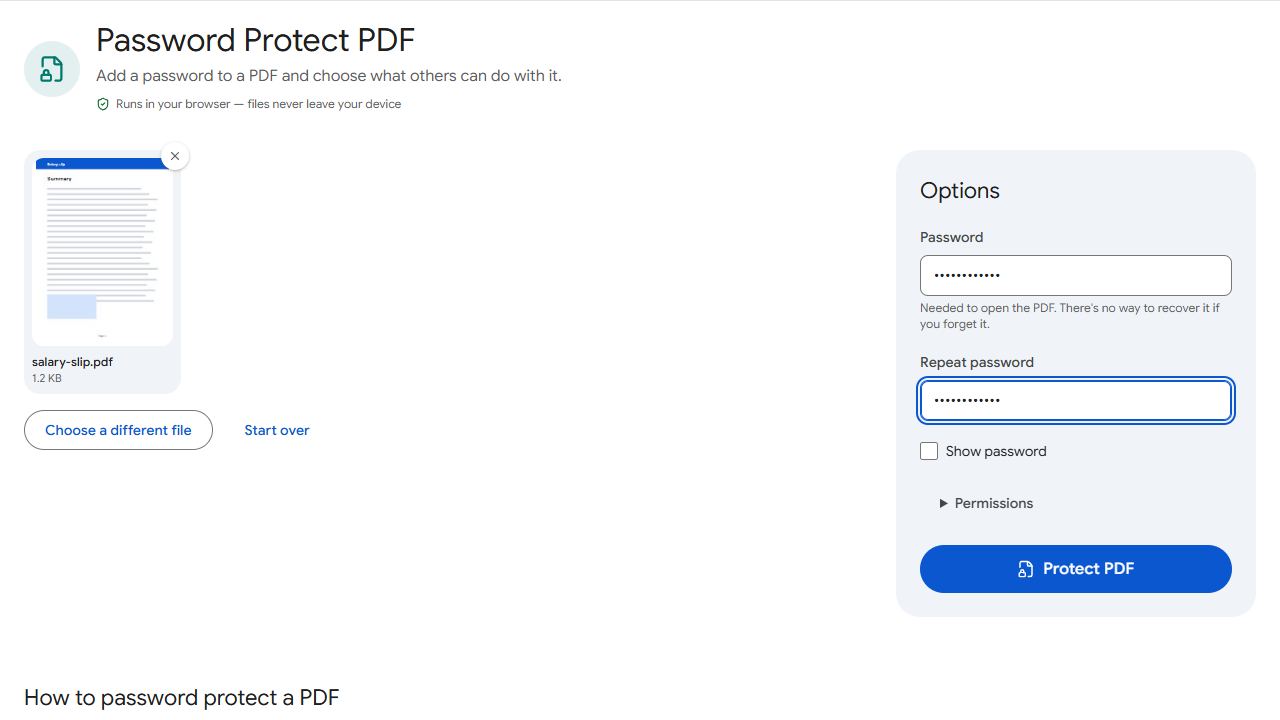
Protect the PDF in Chrome
- Open Protect PDF in Chrome. Firefox, Samsung Internet and other Android browsers work too.
- Tap the upload area. Android opens its file picker; choose the PDF from Downloads, Documents or wherever it is saved.
- Enter a password and repeat it. The two entries have to match before the button works.
- Tap Protect PDF and download the encrypted copy.
The new file keeps the original name with _protected added. Your original stays as it was, so delete it yourself if you no longer want an unprotected copy lying around. Encryption is AES-256 and runs in the browser, so nothing is uploaded.
Where the file goes
Chrome puts the protected copy in your downloads, and the file name ends in _protected. Where that is exactly depends on your phone maker's file manager, so searching for protected is the quickest way to find it. Our guide to where downloaded PDFs are saved on iPhone and Android covers the folders, Chrome's download list and what to do with attachments from Gmail or WhatsApp.
Share it by Gmail, WhatsApp or Drive
Press and hold the protected PDF in your file manager and use the Share option, or attach it from inside Gmail, WhatsApp or whichever app you use. These are only examples; any app that sends files can carry a protected PDF.
Send the password by a different route. If you email the file, text the password, or the other way round. A password pasted into the same chat as the file protects very little.
Choose a password you can share out loud
- Use a short phrase of several unrelated words rather than a date of birth or phone number.
- Avoid symbols that are awkward to read out or type on a small keyboard.
- Store it in your password manager, or keep an unprotected original somewhere safe. A forgotten password cannot be recovered.
Opening a protected PDF on Android
Most PDF viewers on Android ask for the password when you open the file. If you've received a protected PDF and want a copy you can merge or edit, Unlock PDF makes one when you know the password. To lock several documents as one file, join them first with Merge PDF.
To understand what the password does and does not stop, read how to password protect a PDF. To limit printing or copying instead, see how to protect a PDF from editing and copying. On an iPhone or Mac, the steps are in the iPhone guide and the Mac guide.
Common problems and fixes
- I can't find the download in my file manager.
- File managers differ by phone maker, so search for protected, since the new file name ends in _protected, or open Chrome's Downloads list from the three-dot menu.
- The file picker doesn't list my PDF.
- Browse to the folder where the file is stored. A PDF received in WhatsApp or Gmail may need to be saved to your phone first. See where downloaded PDFs are saved.
- The button stays disabled.
- Enter a password and type the same one again in the second box. The tool needs both to match before it protects the file.
Frequently asked questions
No. Chrome and other Android browsers run the tool, and encryption happens on your phone, so nothing is uploaded.
Yes. It is an ordinary PDF file that asks for a password when opened. Send the password through a different route than the file.
Most do, but viewers vary by phone maker. Open the protected file once yourself and confirm it asks before showing a page.